
Enter, review, approve, post —all in one place
The process behind an invoice is always the same. It’s just that today, the tools are scattered. The Invoice Cockpit brings them all together—without interfering with your core SAP system.
/%3E1920/2121x1414-iStock-669887538.jpg?width=500&height=333&name=2121x1414-iStock-669887538.jpg)
Incoming invoices are arriving through an ever-increasing number of channels—email, scanned documents, e-invoices, and EDI. Verification and approval are spread across mailboxes, lists, and systems that are not integrated with one another. The Invoice Cockpit brings them all together in a single interface—from entry to posting in SAP. Every status change is traceable, including the person responsible and the time it occurred.
The process behind an invoice is always the same. It’s just that today, the tools are scattered. The Invoice Cockpit brings them all together—without interfering with your core SAP system.

Incoming emails, scanned documents, XRechnung, ZUGFeRD, and EDI all appear in the same task list—with filters for status, document type, and time period instead of searching through mailboxes.

Multi-step workflows with recipient determination based on roles, delegation rules, and reminder emails. No document gets left behind because someone is on vacation.

The document is stored in SAP, not in a secondary archive. No additional license required, and no migration needed when switching to the next release.
If a purchase order is referenced, the goods receipt-based invoice verification process applies. If no purchase order is referenced, you post using templates for each company code and vendor—either on an absolute or proportional basis.


Where is the invoice, who has it, and since when? The answer is in the list—not at the end of a phone call with the relevant department.
The same solution on ECC, S/4HANA, and SAP Public Cloud. Migrating to S/4HANA does not require you to adopt a new billing process.
Five steps from the entrance to the archive. The values are taken from the purchase order, goods receipt, or account assignment template—you can change any of them yourself. You use function buttons to decide which steps are automated.
Invoices are received via email, scan, e-invoice, or EDI and are automatically created.
Header data and all order numbers are retrieved. Any information not included on the invoice is added: company code and vendor number in SAP.
SAP searches for the goods receipts associated with the recognized order numbers and compares them to the final invoice amount. Until then, the balance shows what is still outstanding—it must be zero for the entry to be posted.
A multi-step workflow with roles, delegates, and reminders. The notification is sent via email and enters the workflow at the "Inbox" stage.
Entries are posted in FI or MM, and the document is archived in SAP in an audit-compliant manner—the processing history remains complete.
The Invoice Cockpit runs as a service provided by blue-zone on the SAP Business Technology Platform—you do not need your own BTP instance. It processes your master data, purchase orders, and goods receipts; posting and archiving take place in your system. One process, one database—but without any changes to the standard SAP system.
Powered by Blue-Zone: Detection, validation, workflow, and Fiori interface—without requiring your own BTP instance.
ECC, S/4HANA, Public Cloud
OData via SAP APIs
RFC via SAP Cloud Connector
Posting and archiving at the core

With the Invoice Cockpit, you can keep track of all open and posted invoices. Real-time data enables quick decisions and prevents bottlenecks. Digital logging of every step ensures complete documentation—ideal for internal audits and tax audits.
Email Inbox
Scan & Recognition
XRechnung / ZUGFeRD
EDI via EDI Zone
Access is provided exclusively through interfaces—using the official SAP APIs whenever possible. Where the standard is insufficient, custom interfaces are added to your system: as extensions, not as modifications to the SAP standard. Your upgrade path remains open.
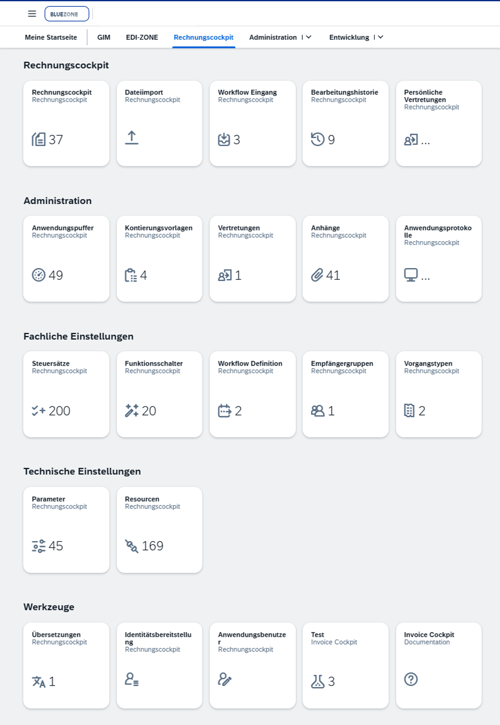
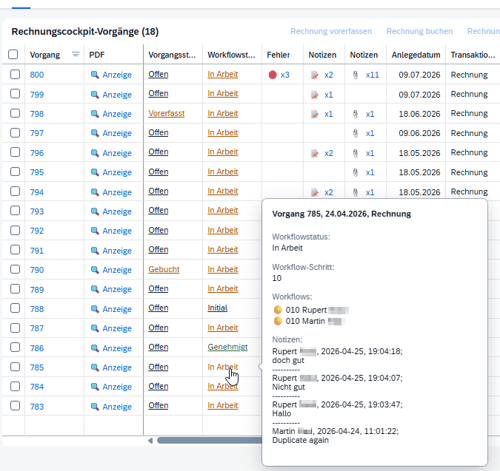
No more searching through inboxes. Open questions are visible instead of buried, and discount deadlines no longer expire unnoticed.
The "Balance" column shows whether a goods receipt has already been assigned to an invoice that has been received: an unchanged balance means there is no goods receipt, while a remaining amount indicates a partial delivery or a discrepancy. You can then search for specific entries based on this information.
An email notifies the recipient of the upcoming approval and routes the message directly to the Inbox workflow—using an out-of-office rule instead of sending a group email to everyone.
Accounting templates and cost center allocations are set up once—they do not need to be reconfigured for each invoice.
Complete processing history for each transaction: who, when, and what status. Easily traceable without having to search through mailboxes.
The Cockpit is operated by blue-zone. You integrate it with your SAP system instead of implementing another system.
Would you like a consultation or a demo? Then feel free to book an appointment with our team using the calendar. We’ll do our best to address your request right away.
30 minutes, split screen: a few slides to set the stage, then our demo system. We’ll walk you through the entire process of an invoice, from receipt to posting—and what ultimately appears in the processing history. Bring up your specific document types and special cases in your questions: We’ll tell you which ones are standard and which aren’t.